SELECT * FROM sys.configurations
WHERE name = 'clr enabled'
To verify NTFS cluster size 64k
powercfg -list
Get-CimInstance -ClassName Win32_Volume | Select-Object Label, BlockSize,FileSystem | Format-Table -AutoSize
gwmi win32_volume -computer computername |Select-Object Label, BlockSize,FileSystem | Format-Table -AutoSize
Get-CimInstance -ClassName Win32_Volume | Select-Object Label, BlockSize,FileSystem | Format-Table -AutoSize
gwmi win32_volume -computer computername |Select-Object Label, BlockSize,FileSystem | Format-Table -AutoSize

To Find the SQL Port number
we can use below query to find out the sql port number in sql server
USE MASTER
GO
xp_readerrorlog 0, 1, N'Server is listening on'
GO
USE MASTER
GO
xp_readerrorlog 0, 1, N'Server is listening on'
GO
http://sql-articles.com/scripts/capture-sql-performance-counters-through-tsql/
http://sql-articles.com/scripts/capture-sql-performance-counters-through-tsql/
Waiting 60 second(s) before polling for further changes.
the merge process could not query the last sent and received generations
Error messages:
The merge process could not query the last sent and received generations. (Source: MSSQL_REPL, Error number: MSSQL_REPL-2147200929)
Get help: http://help/MSSQL_REPL-2147200929
SQL Server Network Interfaces: Error Locating Server/Instance Specified [xFFFFFFFF]. (Source: MSSQLServer, Error number: -1)
Get help: http://help/-1
A network-related or instance-specific error has occurred while establishing a connection to SQL Server. Server is not found or not accessible. Check if instance name is correct and if SQL Server is configured to allow remote connections. For more information see SQL Server Books Online. (Source: MSSQLServer, Error number: -1)
Get help: http://help/-1
Login timeout expired (Source: MSSQLServer, Error number: 0)
Get help: http://help/0
The merge process failed to execute a query because the query timed out. If this failure continues, increase the query timeout for the process. When troubleshooting, restart the synchronization with verbose history logging and specify an output file to which to write. (Source: MSSQLServer, Error number: 0)
Get help: http://help/0
Under SQL Server Agent>Jobs, locate the database subscription that shows the above message.
Right click it and select "Stop Job".
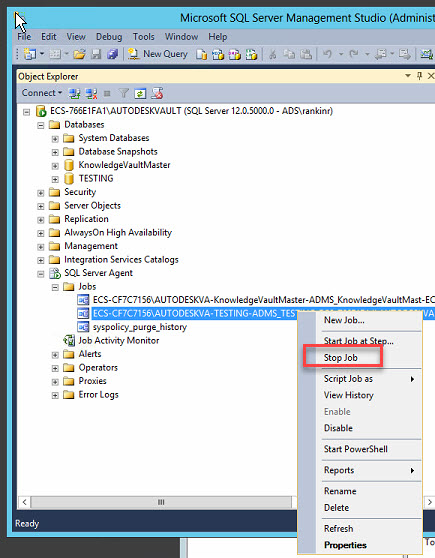
Then, expand Replication>Local subscriptions, find the database, right click it.
From the context menu, select View Synchronization Status.

In the synchronization status screen select the 'Start' button

the merge process could not query the last sent and received generations
Error messages:
The merge process could not query the last sent and received generations. (Source: MSSQL_REPL, Error number: MSSQL_REPL-2147200929)
Get help: http://help/MSSQL_REPL-2147200929
SQL Server Network Interfaces: Error Locating Server/Instance Specified [xFFFFFFFF]. (Source: MSSQLServer, Error number: -1)
Get help: http://help/-1
A network-related or instance-specific error has occurred while establishing a connection to SQL Server. Server is not found or not accessible. Check if instance name is correct and if SQL Server is configured to allow remote connections. For more information see SQL Server Books Online. (Source: MSSQLServer, Error number: -1)
Get help: http://help/-1
Login timeout expired (Source: MSSQLServer, Error number: 0)
Get help: http://help/0
The merge process failed to execute a query because the query timed out. If this failure continues, increase the query timeout for the process. When troubleshooting, restart the synchronization with verbose history logging and specify an output file to which to write. (Source: MSSQLServer, Error number: 0)
Get help: http://help/0
Issue:
In SQL Replication Monitor is the following message.
The merge process could not query the last sent and received
generations. (Source: MSSQL_REPL, Error number: MSSQL_REPL-2147200929)
Causes:
The Merge Agent on the Subscriber needs to be restarted.Solution:
Log in to SQL Server Management Studio and connect to the Subscriber.Under SQL Server Agent>Jobs, locate the database subscription that shows the above message.
Right click it and select "Stop Job".
Then, expand Replication>Local subscriptions, find the database, right click it.
From the context menu, select View Synchronization Status.
In the synchronization status screen select the 'Start' button
SQL Query to get tempdb internal objects
SELECT
st.dbid AS QueryExecutionContextDBID,
DB_NAME(st.dbid) AS QueryExecContextDBNAME,
st.objectid AS ModuleObjectId,
SUBSTRING(st.TEXT,
dmv_er.statement_start_offset/2 + 1,
(CASE WHEN dmv_er.statement_end_offset = -1
THEN LEN(CONVERT(NVARCHAR(MAX),st.TEXT)) * 2
ELSE dmv_er.statement_end_offset
END - dmv_er.statement_start_offset)/2) AS Query_Text,
dmv_tsu.session_id ,
dmv_tsu.request_id,
dmv_tsu.exec_context_id,
(dmv_tsu.user_objects_alloc_page_count - dmv_tsu.user_objects_dealloc_page_count) AS OutStanding_user_objects_page_counts,
(dmv_tsu.internal_objects_alloc_page_count - dmv_tsu.internal_objects_dealloc_page_count) AS OutStanding_internal_objects_page_counts,
dmv_er.start_time,
dmv_er.command,
dmv_er.open_transaction_count,
dmv_er.percent_complete,
dmv_er.estimated_completion_time,
dmv_er.cpu_time,
dmv_er.total_elapsed_time,
dmv_er.reads,dmv_er.writes,
dmv_er.logical_reads,
dmv_er.granted_query_memory,
dmv_es.HOST_NAME,
dmv_es.login_name,
dmv_es.program_name
FROM sys.dm_db_task_space_usage dmv_tsu
INNER JOIN sys.dm_exec_requests dmv_er
ON (dmv_tsu.session_id = dmv_er.session_id AND dmv_tsu.request_id = dmv_er.request_id)
INNER JOIN sys.dm_exec_sessions dmv_es
ON (dmv_tsu.session_id = dmv_es.session_id)
CROSS APPLY sys.dm_exec_sql_text(dmv_er.sql_handle) st
WHERE (dmv_tsu.internal_objects_alloc_page_count + dmv_tsu.user_objects_alloc_page_count) > 0
ORDER BY (dmv_tsu.user_objects_alloc_page_count - dmv_tsu.user_objects_dealloc_page_count) + (dmv_tsu.internal_objects_alloc_page_count - dmv_tsu.internal_objects_dealloc_page_count) DESC
st.dbid AS QueryExecutionContextDBID,
DB_NAME(st.dbid) AS QueryExecContextDBNAME,
st.objectid AS ModuleObjectId,
SUBSTRING(st.TEXT,
dmv_er.statement_start_offset/2 + 1,
(CASE WHEN dmv_er.statement_end_offset = -1
THEN LEN(CONVERT(NVARCHAR(MAX),st.TEXT)) * 2
ELSE dmv_er.statement_end_offset
END - dmv_er.statement_start_offset)/2) AS Query_Text,
dmv_tsu.session_id ,
dmv_tsu.request_id,
dmv_tsu.exec_context_id,
(dmv_tsu.user_objects_alloc_page_count - dmv_tsu.user_objects_dealloc_page_count) AS OutStanding_user_objects_page_counts,
(dmv_tsu.internal_objects_alloc_page_count - dmv_tsu.internal_objects_dealloc_page_count) AS OutStanding_internal_objects_page_counts,
dmv_er.start_time,
dmv_er.command,
dmv_er.open_transaction_count,
dmv_er.percent_complete,
dmv_er.estimated_completion_time,
dmv_er.cpu_time,
dmv_er.total_elapsed_time,
dmv_er.reads,dmv_er.writes,
dmv_er.logical_reads,
dmv_er.granted_query_memory,
dmv_es.HOST_NAME,
dmv_es.login_name,
dmv_es.program_name
FROM sys.dm_db_task_space_usage dmv_tsu
INNER JOIN sys.dm_exec_requests dmv_er
ON (dmv_tsu.session_id = dmv_er.session_id AND dmv_tsu.request_id = dmv_er.request_id)
INNER JOIN sys.dm_exec_sessions dmv_es
ON (dmv_tsu.session_id = dmv_es.session_id)
CROSS APPLY sys.dm_exec_sql_text(dmv_er.sql_handle) st
WHERE (dmv_tsu.internal_objects_alloc_page_count + dmv_tsu.user_objects_alloc_page_count) > 0
ORDER BY (dmv_tsu.user_objects_alloc_page_count - dmv_tsu.user_objects_dealloc_page_count) + (dmv_tsu.internal_objects_alloc_page_count - dmv_tsu.internal_objects_dealloc_page_count) DESC
Subscribe to:
Posts (Atom)